







Screen Markup for Windows
- Trial version
- 4.5
- 9
- V0.3.16
Download for Windows
View an ad to download for free

- RSW Digital Ltd
Draw on your PC screen from your phone or tablet
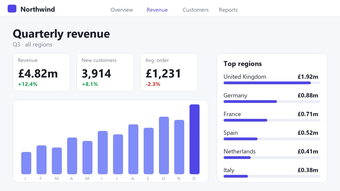
Screen Markup lets you write, draw and point on your Windows PC screen from the phone or tablet already in your hand. Teachers can annotate a slide while walking round the classroom, trainers can circle the exact button they mean, and presenters can highlight a chart on a Teams, Zoom or Google Meet call without going back to the desk.
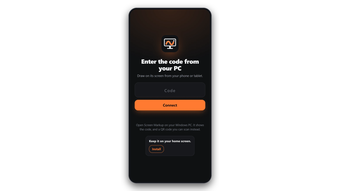
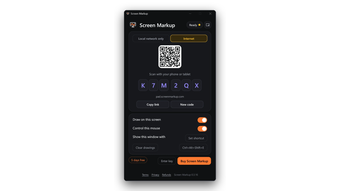
How it works: Install the small Windows app (about 7 MB). It shows a QR code and a six-character code. Scan the code, or type it into on any iPhone, iPad, Android phone or Android tablet. The browser page opens straight away with a live view of your PC screen. There is nothing to install from an app store.
Features: live view of your PC screen on the phone or tablet; smooth ink with pens, highlighters, straight lines, arrows and shapes, plus undo and clear; mouse mode to click through slides and move between apps from across the room; click-through ink that doesn't get in the way of normal PC use; fade the live view when you only need the pad; works on the same Wi-Fi, a different Wi-Fi or mobile data with no router or firewall setup; ink shows up in Teams, Zoom, Google Meet and OBS shares and recordings; automatic update check on start.
Private by design: only devices with your six-character code can connect. The screen picture and input travel through an encrypted relay and are never stored. Change the code at any time or switch off mouse control.
Who it's for: teachers and lecturers, online tutors, corporate trainers, sales and support staff giving demos, streamers and YouTubers, and anyone who wants a cheap, wireless alternative to a graphics tablet or interactive whiteboard.
Licence: 7-day free trial, then 10 GBP + VAT per year or 25 GBP + VAT once for lifetime use.
Requirements: Windows 10 or 11 (64-bit), main monitor. Controller: any modern phone or tablet browser. Developer: RSW Digital Ltd. Website:
Loading…
App specs
Developer
- RSW Digital Ltd
License
Trial version
Version
0.3.16
Latest update
Platform
Windows
OS
Windows 10
Language
English
Downloads
9
Last month's downloads
- 9
Size
7.89 MB
Screen Markup for PC
- Trial version
- 4.5
- 9
- V0.3.16
Download for PC
View an ad to download for free
User reviews about Screen Markup
Have you tried Screen Markup? Be the first to leave your opinion!
Add reviewTop downloads Remote PC for Windows
Top downloads Remote PC for Windows
Top downloads Remote PC for Windows
Related topics about Screen Markup
Latest articles

Quentin Tarantino westerns hit Prime Video: Django and The Hateful Eight

Google Flights updates holiday guide: Thanksgiving deals fade, Christmas fares hit a sweet spot

James Webb may have spotted the earliest giant black holes yet

The Dark Knight Trilogy is leaving Netflix UK: watch it by November 7

Sucker Punch in the U.S.: it’s streaming, just not on Netflix
Laws concerning the use of this software vary from country to country. We do not encourage or condone the use of this program if it is in violation of these laws. Softonic may receive a referral fee if you click or buy any of the products featured here.